The repadmin /showobjmeta command is used to display the replication metadata information of a specific object in the Active Directory environment. The command output shows detailed version number (Version), last change time (Originating Change Time), Domain Controller (Originating DSA) and USN information that created the change for each attribute.
This command provides great convenience especially in the following scenarios:
To examine the history of changes made to a specific user, group or computer object,
Analyzing Active Directory replication problems at the object level,
To verify which Domain Controller created the change based on attributes and when the change occurred,
To follow the update and synchronization processes in detail.
For example, the following command displays the metadata information of the relevant user object via the specified Domain Controller:
repadmin /showobjmeta DC "CN=adm msft,OU=IT,DC=msftadvocate,DC=local"
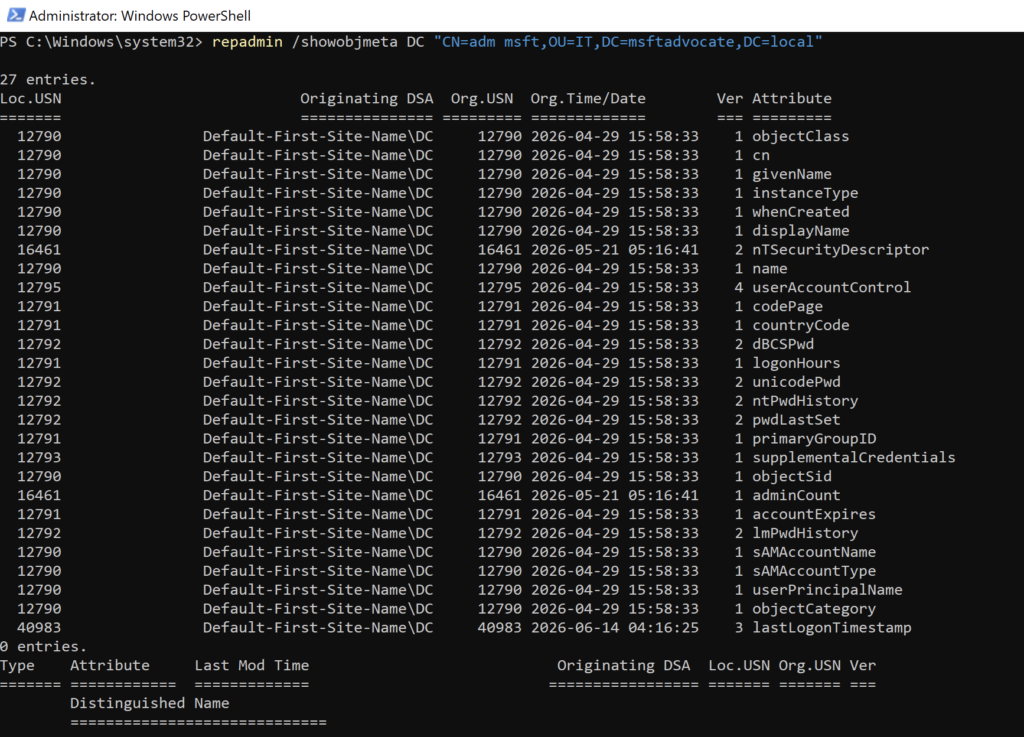
repadmin /showobjmeta is one of the most useful diagnostic tools for system administrators and Microsoft infrastructure consultants, especially when troubleshooting Active Directory replication problems and performing object-based change analysis.